
Leaving your dog at home can make an ordinary errand feel longer than it is. A camera with a treat dispenser lets you check the room, speak through an app, and offer an occasional reward from afar. The best dog camera with treat dispenser for your home depends on more than video resolution: consider the camera’s field of view, treat compatibility, subscription terms, Wi-Fi band, storage, and how your dog responds to a voice or treat tossed from a device.
We compared seven products whose identities, Amazon destinations, and authorized product images were verified through PetAdvisorPro’s authenticated product workflow. Feature details below are based on current manufacturer information where available. No product here should be treated as a substitute for walks, training, a pet sitter, or a safe plan for a dog that struggles when left alone.
Quick Picks
| Product | Best For | Key Advantage | Buy | |
|---|---|---|---|---|
| Furbo 360° Dog Camera | 360° room coverage | Rotating view and treat toss | View on Amazon | Jump to Review |
| Petcube Bites 2 Lite | Wide-angle value | 160° view and treat flinging | View on Amazon | Jump to Review |
| eufy Pet Dog Camera D605 | Local storage | Treat toss distance options | View on Amazon | Jump to Review |
| WOPET Guardian D01 Plus | Two-band Wi-Fi | 165° view and two-way audio | View on Amazon | Jump to Review |
| Furbo Mini 360° Pet Camera | Compact 2K view | 360° camera in a mini body | View on Amazon | Jump to Review |
| SKYMEE Petalk AI II | Wide panning coverage | 180° pan with treat dispensing | View on Amazon | Jump to Review |
| TKENPRO 2K Pet Camera Treat Dispenser | Feature-rich 2K option | Auto tracking and treat tossing | View on Amazon | Jump to Review |
How to Choose a Dog Camera With Treat Dispenser
View and tracking: A fixed wide-angle camera can cover a room when you position it well. Pan or rotating models can follow movement, but walls and furniture still create blind spots. Treat compatibility: Read the model-specific size and shape guidance; dry pieces that fit the dispenser are less likely to jam. Start with a few treats while you are home. Subscription and recordings: Separate live viewing and treat tossing from cloud clips, smart alerts, or other paid services. If video storage matters, check whether the device has local storage. Wi-Fi: Confirm the camera supports your router’s available band and will have a stable signal where you plan to place it. Safety and placement: Use a stable surface, keep cords away from chewing, and test the app and sound with your dog present.
A treat camera works best as a brief interaction tool. Treats add calories, so count them as part of your dog’s daily allowance. If your dog guards food, becomes more agitated by your voice, or is unsafe when alone, skip remote tossing until you have a plan that suits your dog. A treat dispenser also cannot respond to a spill, injury, or other problem the way a person can.
1. Furbo 360° Dog Camera

What We Like
- 360° rotation follows movement within one room
- 1080p video with 4x digital zoom
- Automatic night vision for low-light checks
- Two-way audio plus remote treat tossing
- 100-treat capacity with stated treat-size guidance
What We Don’t Like
- Smart alerts and cloud clips may require a paid plan
- Treat shape and size need testing before routine use
Product Description
The Furbo 360° Dog Camera is the clearest fit if your dog moves around the room and a fixed view would leave blind spots. Its rotating camera provides a full-room view, while the 1080p video, 4x digital zoom, and automatic night vision help you check details in daylight or low light. The two-way audio lets you listen and speak through the app, and the device can toss small dry treats remotely. Furbo lists a 100-piece treat capacity and recommends round treats about 0.5 inches across. Those details matter: oversized or soft treats may not toss reliably, so use the manufacturer’s guidance and test a small amount before relying on it.
The main decision is the service plan. The verified Amazon listing identifies this version as having core features without ongoing cost, while Furbo’s current product information separates real-time viewing, talking, and treat tossing from Furbo Nanny features such as smart activity alerts and cloud clips. Confirm the exact listing and included plan before checkout because subscription bundles differ. Place the camera on a stable surface with a clear view and keep the power cable out of chewing reach. Treat tossing is an occasional way to interact; it does not replace a walk, a sitter, or a safe plan for a dog that becomes distressed when alone. The spinning view is useful when your dog changes position, but rotation cannot cover multiple rooms or obstacles outside the camera’s line of sight. Before regular use, test the toss distance, camera rotation, and audio at home, then adjust the spot so treats land on a clear surface your dog can reach safely.
My Recommendation
The Furbo 360° is my first choice for a dog that moves around a single room because its rotating view, treat toss, and two-way audio cover the main remote check-in needs. It is especially appealing if you want core interaction without a continuing plan. Choose it only after confirming the exact listing and which smart alerts or recordings require Furbo Nanny. If you would rather keep recordings local, the eufy D605 may suit you better; if subscription activation is unwelcome, avoid the Mini 360° listing.
2. Petcube Bites 2 Lite

What We Like
- 160° fixed wide-angle view for room coverage
- 1080p video with 8x digital zoom
- Treat-size inserts help fit different dry treats
- Two-way audio and automatic night vision
- Cloud clips and smart alerts available through Petcube Care
What We Don’t Like
- Fixed lens cannot pan after a dog leaves its view
- Cloud clips and smart alerts depend on Petcube Care
Product Description
Petcube Bites 2 Lite is a useful middle ground when you want a treat camera with a broad fixed view rather than a rotating head. Petcube lists 1080p video, a 160-degree wide-angle view, 8x digital zoom, automatic night vision, two-way audio, and a built-in treat dispenser. The camera’s wide angle can cover much of a room from one placement, while the zoom helps you inspect what the live view captures. Petcube includes treat-size inserts, which can help manage dispensing for different dry treats. Check the current user guide for compatible treat sizes and use the insert that fits; dispensing performance depends on the treat shape and size.
The tradeoff is that a fixed camera cannot pan after your dog moves behind furniture or out of its field of view. Petcube’s cloud clips and smart alerts are associated with Petcube Care, so review the app’s current free and paid functions before deciding whether you need a plan. Basic live monitoring and interaction are separate from optional cloud history. The device is a tall, mains-powered indoor unit, so choose a stable shelf or mount and secure its cable. If your dog is likely to knock devices over, placement deserves extra thought. Bites 2 Lite is most compelling for a household that values a wide-angle picture and treat interaction in one spot; a pan-and-tilt camera is a better match when the dog roams widely. Use the setup period to confirm the shelf or wall gives the lens a clear view of your dog’s main resting area. Check that treats land away from furniture, cords, and stairs.
My Recommendation
Petcube Bites 2 Lite is a good match when you want a wide, fixed view and a treat dispenser without requiring pan movement. Its 160-degree lens and included treat inserts are useful in a main room with a clear placement. I would compare the optional Petcube Care costs before buying if saved clips or smart alerts matter to you. If your dog regularly leaves the camera’s field of view, select a rotating option such as the Furbo 360° or eufy D605 instead.
3. eufy Pet Dog Camera D605
What We Like
- Built-in 16GB eMMC for local recordings
- Daily activity video from captured clips
- Rotating view with motion tracking
- App offers adjustable treat-toss distances
- No monthly fee stated for local-storage features
What We Don’t Like
- Remote app controls still depend on working Wi-Fi
- Treats must stay under eufy’s stated 20 mm limit
Product Description
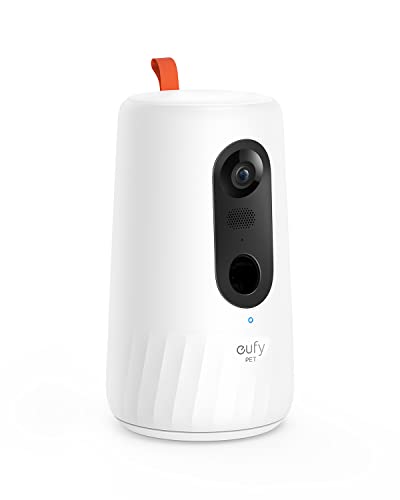
The eufy Pet Dog Camera D605 stands out for owners who want recordings stored on the device. eufy’s support information says the camera has built-in 16GB eMMC storage and can create a daily video from recorded activity; its product title also identifies local storage and no monthly fee. The 1080p camera can rotate through a broad area, and the app can toss treats at different distances. Two-way audio, night vision, and motion tracking add practical ways to check in and respond. eufy says its treat container is designed for treats under 20 mm, so confirm your dog’s treats fit and dispense consistently before leaving the camera in routine use.
Local storage avoids depending on a cloud plan for the recordings described by eufy, but it does not remove the need for a reliable Wi-Fi connection for remote live viewing and app controls. Check eufy’s current setup notes and the exact listing for compatibility and support status; product availability and app support can change over time. The rotating body and treat launcher make this a more feature-dense choice than a basic fixed camera, but more mechanisms also mean more parts to keep clean and troubleshoot. Its recording features are for reviewing activity, not for diagnosing a health issue. If you need a simple live view and occasional treat toss, a less complex model may be easier to live with. The built-in storage is a useful differentiator if you want to review clips later, though you should check available capacity and the app’s recording controls before treating it as continuous security footage.
My Recommendation
Choose the eufy D605 if on-device recording and treat toss distance options are priorities. Its local storage and 16GB capacity are useful distinctions, and remote features are described by eufy without a monthly fee for the listed core functions. Confirm current app support and availability before purchase. The WOPET D01 Plus is a simpler alternative if your main needs are live view, dual-band Wi-Fi, and two-way audio rather than a rotating camera with onboard recordings.
4. WOPET Guardian D01 Plus

What We Like
- 2.4GHz and 5GHz Wi-Fi support
- 165° wide-angle lens for one-room viewing
- 1080p video with night vision
- Two-way audio for quick check-ins
- 0.5-liter reservoir for dry treats
What We Don’t Like
- Fixed wide-angle view lacks a rotating camera head
- Plug-in placement depends on a nearby safe outlet
Product Description
The WOPET Guardian D01 Plus is a practical option if your home network uses either 2.4GHz or 5GHz Wi-Fi. WOPET’s product information lists both bands, a 1080p camera, a 165-degree wide-angle lens, night vision, two-way audio, and app-controlled treat tossing. The manufacturer gives a 0.5-liter treat reservoir and recommends dry pieces in a limited size range; the smaller 2–15 mm guidance appears in its support materials for the newer Guardian camera, so check the manual for the precise model you receive. The D01 Plus is a plug-in device, so it is intended for a fixed indoor location near power rather than portable monitoring.
Its wide lens can show a substantial part of one room, but it does not provide the full rotating coverage of a pan camera. The two-way sound and treat function make quick check-ins easy, yet voice playback may excite some dogs, so try it while you are home and see how your pet responds. WOPET’s troubleshooting guidance also notes that a blocked outlet can interfere with treat dispensing; keeping the hopper clean and using dry, appropriately sized treats can reduce avoidable jams. Wi-Fi range and signal quality still affect remote video. Consider this camera when dual-band connectivity and straightforward interaction matter most, and choose a rotating model if your dog routinely moves outside a fixed wide-angle view. Before choosing a permanent spot, test video and audio from the areas you use most, then send a few treats while you are present. That reveals Wi-Fi dead zones and whether the outlet points safely into open floor space.
My Recommendation
The WOPET Guardian D01 Plus is worth considering if your router supports either Wi-Fi band and you want a broad fixed view with treat tossing. It keeps the feature set straightforward and the manufacturer publishes treat and setup guidance. I would pick a rotating camera if your dog crosses the room often, and I would confirm the model number and treat-size instructions before filling the reservoir. For documented local video storage, the eufy D605 is a stronger alternative.
5. Furbo Mini 360° Pet Camera
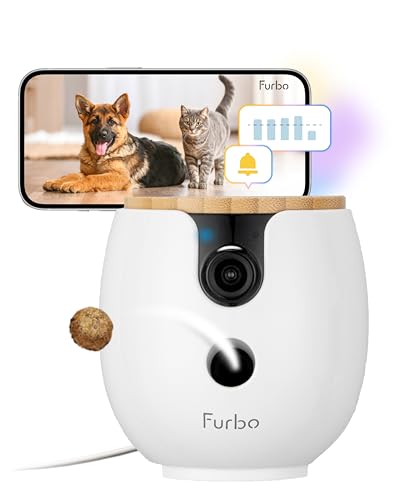
What We Like
- 2K QHD video in a compact camera body
- 360° rotating view for room checks
- App-based treat toss and two-way interaction
- Treat-toss helper can respond to stuck treats
- Useful fit for compact rooms and shelves
What We Don’t Like
- Verified listing requires a paid plan for activation
- Treat sizing and subscription terms need checking
Product Description
The Furbo Mini 360° is a smaller rotating option for a shelf or compact room, with a 2K QHD camera and treat dispensing. Furbo’s product and help pages describe a 360-degree rotating view, app-based treat toss, two-way interaction, and a treat-toss helper that can respond when a treat gets stuck. The camera’s compact size may make placement easier in a small apartment or a room where a full-size device would feel intrusive. Furbo also publishes treat guidance for this model; choose dry treats around the recommended diameter and check that they move through the dispenser before relying on the feature.
The important limitation is the verified listing’s plan requirement: it is identified as requiring a paid plan to activate. Compare that condition with the Furbo 360° listing before buying, because the cost and required features can vary by package. A subscription may be acceptable if you want Furbo’s connected services, but it is a poor surprise if you only expected a camera and toss control to work on their own. As with other rotating cameras, furniture and room layout can still block the view. The Mini 360° suits someone who wants panning coverage in a smaller device and is comfortable checking the subscription terms; shoppers who want to avoid a recurring plan should compare the other verified options first. Because the plan requirement changes the value calculation, compare the total first-year cost with a stand-alone model before purchase. Verify the unit’s current activation steps and app compatibility for your phone.
My Recommendation
The Furbo Mini 360° is the compact option for someone who wants a rotating view in a smaller device and accepts the paid activation plan. Its 2K camera and treat toss may suit a small room, but the subscription is a meaningful ownership cost and should be checked before purchase. If you want similar room coverage without that plan requirement on the verified listing, compare the standard Furbo 360° first. For a wide fixed view, Petcube Bites 2 Lite is another alternative.
6. SKYMEE Petalk AI II

What We Like
- 180° pan helps track movement across a room
- Full HD video with listed 5GHz Wi-Fi
- Remote treat tossing through the app
- Two-way audio with night vision
- Motion alerts prompt a live-view check
What We Don’t Like
- 180° pan does not provide a full 360° sweep
- Listed 5GHz requirement may not suit every router
Product Description
SKYMEE Petalk AI II combines an app-controlled treat dispenser with a camera that pans across a wide area. Its verified listing identifies a 5GHz Wi-Fi connection, Full HD video, and 180-degree pan; the manufacturer’s product information describes remote treat tossing, two-way audio, night vision, and motion alerts. That combination can work well when a fixed lens would miss a dog moving across the room, but it is not the same as a full 360-degree rotation. Confirm your router and the specific listing’s network requirements before purchase, since older SKYMEE models may have different Wi-Fi compatibility.
This model is a fit for owners who want panning coverage and remote play in one device without needing the more expensive brand ecosystem. Set it where the camera has a clear sweep and the treat outlet points toward an open floor area. Check treat-size guidance and test the toss distance while you are present; a treat landing under furniture can frustrate a dog or make the reward hard to find. Smart alerts can help you decide when to open the live feed, but motion notifications are not a substitute for continuous supervision. The product’s features and setup details can differ between Petalk generations, so match the model number and current listing instead of relying on photos of a similar SKYMEE camera. A wide pan range can still leave corners out of view, so position the camera toward the area where your dog usually rests rather than assuming it covers the home. Check Wi-Fi strength there before mounting.
My Recommendation
SKYMEE Petalk AI II may suit households that want 180-degree panning, two-way audio, and app-controlled treat tossing. I would confirm the precise generation and network requirements before buying, because SKYMEE models can differ. Try the alerts and treat path while home so you can see how your dog responds. If a full 360-degree sweep matters more than panning, Furbo 360° or eufy D605 may be a better match; if you prefer storage details, look closely at eufy.
7. TKENPRO 2K Pet Camera Treat Dispenser

What We Like
- 2K video paired with 360° auto tracking
- Dual-band 2.4GHz and 5GHz support
- Remote treat toss from the phone app
- Two-way talk for brief interaction
- Motion alerts accompany live monitoring
What We Don’t Like
- Exact treat limits and storage terms need confirmation
- Verified item details leave app-plan terms unclear
Product Description
The TKENPRO 2K Pet Camera Treat Dispenser offers a broad feature set on its verified Amazon listing: 2K video, 360-degree auto tracking, remote treat tossing, two-way talk, motion alerts, and support for 2.4GHz and 5GHz Wi-Fi. Auto tracking can help keep a moving dog within the camera’s view, while two-way audio and the dispenser let you interact through the phone app. The listing identifies it as an indoor camera for pets. Check the exact model and current app instructions before buying, since features, software support, and included services can vary across similar-looking products from the same category.
This is best considered by a shopper who wants several functions at a lower-friction setup and is willing to verify details carefully. Confirm what the app provides without a paid plan, what recordings are stored, and the manufacturer’s recommended treat dimensions; those details were not established by the verified item title alone. Keep the device on a stable surface, use only suitable dry treats, and test both tracking and dispensing before leaving your dog alone with it. A broad feature list does not guarantee a dependable connection in every home, so Wi-Fi signal and app reliability matter. If you prefer documented storage policies or detailed support resources, compare eufy, Furbo, or Petcube before choosing. Use the exact model number when checking instructions and app terms, and test the live feed, auto tracking, treat toss, and notifications before relying on it during an absence. Keep a clear landing area and count rewards in your dog’s daily food plan.
My Recommendation
TKENPRO packs several useful features into one listing, including 2K video, auto tracking, treat tossing, and two Wi-Fi bands. It is a candidate for shoppers who value feature breadth, but some ownership details such as storage and subscription needs were not established by the verified listing title. Check those before checkout and install the current app before relying on it. For more clearly documented manufacturer support and local storage information, I would compare the eufy D605; for a mature treat-camera ecosystem, consider Furbo.
Final Verdict
For most homes, the Furbo 360° Dog Camera is the best all-around starting point because its rotating view, treat toss, and two-way audio address the central reasons to buy this category. Petcube Bites 2 Lite is a strong wide-angle fixed-view alternative, while eufy D605 is the standout for owners who want local recording. Before buying, confirm the exact listing’s subscription terms, network support, treat-size guidance, and app features. Place the camera securely and test it with your dog while you are present.
Frequently Asked Questions
Can a treat camera help a dog with separation anxiety?
It can let you check in and offer a familiar reward, but a camera is not a treatment for separation anxiety. Some dogs may become more unsettled by a remote voice or treat toss. If your dog shows serious distress when alone, discuss a suitable behavior plan with your veterinarian or a qualified behavior professional.
Do dog cameras with treat dispensers need a subscription?
It depends on the model and package. Live video and treat tossing may be included while cloud recording, saved clips, or advanced alerts may require a plan. One verified listing here specifically requires a paid activation plan. Check the current product listing and app plan before purchase.
What treats should I use in a dog camera dispenser?
Use dry treats that meet the camera manufacturer’s size and shape guidance. Test the dispenser at home first and clean it as directed. Do not assume every treat that fits the opening will toss reliably.
Can I use a treat camera instead of a pet sitter?
No. It lets you see and interact remotely, but it cannot take your dog outside, refill water, or respond in person to an urgent situation. Arrange appropriate care when your dog needs more than a brief check-in.
Should I choose a rotating camera or a fixed wide-angle model?
Choose rotating or pan coverage if your dog moves around the room and you want the camera to change direction. A fixed wide-angle camera may be simpler for a smaller room with a clear view. Furniture and walls can block either type.
For an outdoor wearable camera instead of an indoor treat dispenser, see our guide to action cameras for energetic dogs that swim.